


NSFAS applications for the 2026 academic year are now officially closed, and the next critical step for applicants is checking their NSFAS application status online.
The National Student Financial Aid Scheme (NSFAS) is the primary source of financial assistance for students studying at public universities and TVET colleges in South Africa. From 15 December 2025, NSFAS began communicating application outcomes via the myNSFAS portal.
This comprehensive guide explains how to check your NSFAS application status for 2026, what each status means, required documents, troubleshooting steps, and what to do after approval or rejection.
NSFAS Application 2026 Status Check
There are four official ways to check your NSFAS application status for the 2026 academic cycle. The recommended option is the myNSFAS portal, but alternative methods are available if you experience technical issues.
Method 1: Check Your Status via the myNSFAS Portal (Recommended)
The MyNSFAS portal is the most comprehensive and official way to track your application.
Step-by-Step Instructions:
Step 1: Open your web browser and navigate to www.nsfas.org.za
Step 2: Click on the “myNSFAS” button on the homepage
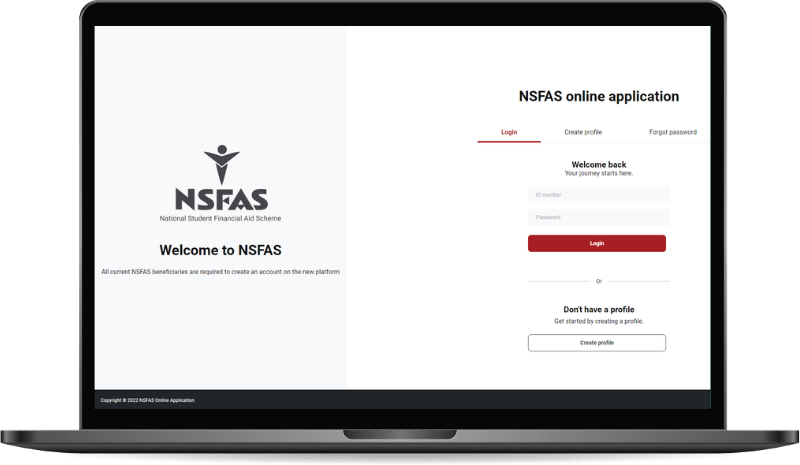
Step 3: You’ll be redirected to the myNSFAS portal login page
Step 4: Enter your login credentials:
- Username (usually your ID number or the username you created)
- Password
Step 5: Click “Login”
Step 6: Once logged in, navigate to “Track Funding Progress” or “Application Status”
Step 7: View your current status, which may show:
- Application received
- Documents outstanding
- Application under review
- Eligibility determination
- Funding approved
- Funding declined (with reasons)
Step 8: Check for any notifications or requests for additional documentation
Step 9: If documents are required, upload them directly through the portal
Pro Tip: Take screenshots of your status for your records and future reference.
Method 2: Check NSFAS Status via SMS
NSFAS offers a convenient SMS status checking service.
Step-by-Step Instructions:
Step 1: Open the messaging app on your mobile phone
Step 2: Create a new SMS message
Step 3: Type your ID number in the message body
Step 4: Send the SMS to 31592
Step 5: Wait for a response (usually within minutes to a few hours)
Step 6: Read the status message carefully
Step 7: Save the SMS for your records
Important Notes:
- Standard SMS rates apply
- Ensure you send from the cellphone number registered with NSFAS
- The response will indicate your current application status
- If you receive an error, verify your ID number is correct
Method 3: Check Your NSFAS Status on the NSFAS Website
You can check your status directly on the NSFAS website without logging into the full portal.
Step-by-Step Instructions:
Step 1: Visit www.nsfas.org.za
Step 2: Look for the “Check Application Status” or “Track Application” link on the homepage
Step 3: Click on the link to access the status checker
Step 4: Enter your ID number in the required field
Step 5: Complete any security verification (if required)
Step 6: Click “Submit” or “Check Status”
Step 7: Review the status information displayed
Step 8: Note any action items or documentation requests
Method 4: Contact the NSFAS Support Centre
If you prefer personal assistance or encounter technical difficulties, contact NSFAS directly.
Contact Options:
Option A: Telephone
Step 1: Call the NSFAS call centre at 08000 67327 (toll-free)
Step 2: Listen to the automated menu options
Step 3: Select the option for application status inquiries
Step 4: Wait to speak with a consultant (be prepared for possible wait times)
Step 5: Provide your ID number and personal details for verification
Step 6: The consultant will provide your current status
Step 7: Ask any questions you may have
Step 8: Take note of reference numbers for your call
Operating Hours: Monday to Friday, 8:00 AM to 4:30 PM
Option B: Email
Step 1: Compose an email to info@nsfas.org.za
Step 2: Include in your subject line: “Application Status Inquiry”
Step 3: In the body, provide:
- Your full name
- ID number
- Cellphone number
- Brief description of your inquiry
Step 4: Send the email
Step 5: Wait for a response (typically 5-10 business days)
Step 6: Check your spam folder if you don’t receive a response
Option C: Social Media
NSFAS maintains active social media channels:
- Facebook: @mynsfas
- Twitter (X): @myNSFAS
- Instagram: @mynsfas
Send a direct message with your inquiry (avoid posting personal information publicly).
Important Notice for 2026: Applications for the 2026 academic year are currently closed. Students should monitor the official NSFAS website and communications channels for announcements regarding the opening of the 2027 application cycle.
What Does NSFAS Funding Cover?
NSFAS provides comprehensive financial support that covers:
- Tuition Fees: Full coverage of registration and tuition costs at your institution
- Accommodation: On-campus residence fees as well as off-campus accommodation allowance (if applicable and approved)
- Learning Materials: Allowance for textbooks, stationery, and other essential academic resources
- Transport: Travel allowance to assist with commuting costs between home and institution
- Living Allowance: Personal care and living expenses allowance
- Additional Support for Students with Disabilities: Students with disabilities can access additional funding by submitting a completed and signed Disability Annexure Form, which may cover:
- Specialised equipment
- Assistive technology
- Additional support services
- Tailored accommodation arrangements
Why Checking Your NSFAS Status is Important
With applications for 2026 now closed, current applicants should focus on checking their status and responding promptly to any requirements or appeals process. Monitoring your application status allows you to:
- Plan ahead: Know whether you need to explore alternative funding sources
- Meet deadlines: Respond promptly to requests for additional documentation
- Address issues: Identify and resolve problems early in the process
- Confirm funding: Ensure your financial aid is secured before registration
- Make informed decisions: Choose your institution based on confirmed funding
Understanding Your NSFAS Application Status
There are a few possible status messages that you could receive as formal communication from the government agency and here’s what they mean:
1. Application Received
Your application has been successfully submitted and is in the system awaiting processing.
Action Required: None at this stage. Monitor for updates.
2. Documents Outstanding
NSFAS requires additional documentation to process your application.
Action Required:
- Check what specific documents are needed
- Upload required documents immediately via the myNSFAS portal
- Ensure documents are clear, legible, and certified where necessary
3. Application Under Review
Your application is being evaluated against eligibility criteria.
Action Required: None. Wait for the outcome. This process may take several weeks.
4. Eligibility Confirmed
You meet the eligibility criteria for NSFAS funding.
Action Required: Continue monitoring for final approval and funding allocation.
5. Conditionally Approved
Funding is approved subject to certain conditions (e.g., enrolment confirmation, additional documents).
Action Required:
- Fulfil all conditions promptly
- Register at your institution
- Submit proof of registration if required
6. Approved/Funded
Congratulations! Your funding has been approved.
Action Required:
- Proceed with registration at your institution
- Sign the NSFAS agreement form
- Provide banking details if required
- Confirm acceptance of the bursary
7. Application Declined/Not Approved
Your application was unsuccessful.
Action Required:
- Check the reason for decline
- Review if you can appeal
- Consider reapplying if circumstances change
- Explore alternative funding options
8. Awaiting SASSA Verification
NSFAS is verifying your household income through SASSA databases.
Action Required: Ensure your SASSA information is up to date and accurate.
9. Defunded
Your funding was previously approved but has been withdrawn.
Action Required:
- Contact NSFAS immediately to understand the reason
- This may occur due to academic performance, cancellation of registration, or incorrect information
Troubleshooting Common Issues
You may come across issues with gaining access to your MyNSFAS portal and checking your application status. Fear not, we’ve collated a series of steps to troubleshoot the most common issues:
Problem 1: Cannot Log into MyNSFAS Portal
Solutions:
- Verify you’re using the correct username and password
- Use the “Forgot Password” function to reset
- Clear your browser cache and cookies
- Try a different browser or device
- Ensure stable internet connection
- Contact NSFAS support if issues persist
Problem 2: Status Shows “Documents Outstanding” But You’ve Uploaded
Solutions:
- Documents may still be processing (allow 48-72 hours)
- Verify documents meet NSFAS requirements (certified, clear, complete)
- Re-upload documents if necessary
- Contact NSFAS to confirm receipt
Problem 3: No Response After Checking Status
Solutions:
- Verify you’re using the correct ID number
- Ensure your application was successfully submitted
- Contact NSFAS directly for verification
- Check that you applied before the deadline
Problem 4: Status Hasn’t Updated in Weeks
Solutions:
- Be patient during peak processing periods
- Contact NSFAS for an update
- Ensure all required documents are submitted
- Verify your application is complete
Documents Required for NSFAS Applications
While checking your status, you may be asked to submit or verify documents. Common requirements include:
Essential Documents:
- Identity Document
- Copy of applicant’s ID or birth certificate
- If under 18, parent/guardian ID copies
- Proof of Income
- Recent payslips (if employed)
- Unemployment letter (if unemployed)
- Death certificate (if parent/guardian is deceased)
- Divorce decree (if applicable)
- Affidavit for informal income
- Proof of Residence
- Utility bill or municipal account (not older than 3 months)
- Affidavit if no formal address
- Academic Records
- Latest school report or results
- Matric certificate or final results
- Consent Form
- Signed consent allowing NSFAS to verify information
- Disability Annexure (If Applicable)
- Completed and signed Disability Annexure Form
- Medical documentation supporting disability claim
- Prescription for assistive devices or technology
NSFAS Eligibility Criteria
Understanding eligibility helps you anticipate your application outcome:
Basic Requirements:
- Citizenship: South African citizen
- Income threshold:
- Combined household income not exceeding R350,000 per year
- Students with disabilities: household income not exceeding R600,000 per year
- Academic institution: Must be registered at a public university or TVET college
- Academic performance:
- Must meet minimum academic requirements
- Maintain satisfactory academic progress for continued funding
- SASSA beneficiary: If your household receives SASSA grants, you likely qualify
After Your Application is Approved
Next Steps:
1. Sign the NSFAS Agreement
- Read terms and conditions carefully
- Sign and submit the bursary agreement form
- Understand your obligations as a funded student
2. Register at Your Institution
- Complete registration within specified timeframes
- Provide NSFAS reference number to institution
- Confirm your course and modules
3. Provide Banking Details
- Open a bank account if you don’t have one
- Submit banking details for allowance payments
- Verify details are correct to avoid payment delays
4. Collect Student Cards/Allowances
- Some institutions use voucher systems
- Direct payments made monthly
- Budget your allowances appropriately
5. Maintain Academic Standing
- Pass required percentage of modules
- Meet academic progress requirements
- Failure may result in funding withdrawal
Appeals Process
If your application is declined, you have the right to appeal:
How to Appeal:
Step 1: Review the reasons for decline carefully
Step 2: Gather supporting documentation that addresses the decline reasons
Step 3: Log into myNSFAS portal
Step 4: Navigate to the appeals section
Step 5: Complete the appeal form with detailed reasons
Step 6: Upload supporting documents
Step 7: Submit appeal within the specified timeframe (usually 30 days)
Step 8: Monitor your status for the appeal outcome
Common Grounds for Appeal:
- Incorrect income assessment
- Technical errors in application processing
- Changes in household circumstances
- New supporting documentation available
- Administrative errors
Frequently Asked Questions About NSFAS Applications
Q1: How long does NSFAS take to process applications?
A: Processing typically takes 2-4 months, but can extend during peak periods. Check your status regularly for updates.
Q2: Can I check someone else’s NSFAS status?
A: No, NSFAS status is confidential and can only be accessed by the applicant using their personal credentials.
Q3: What if my status shows an error?
A: Contact NSFAS immediately via phone (08000 67327) or email (info@nsfas.org.za) with details of the error.
Q4: Can I apply for NSFAS if I’m currently studying?
A: Yes, continuing students must reapply annually, though the process is streamlined for returning students.
Q5: Does NSFAS fund postgraduate studies?
A: NSFAS primarily funds undergraduate qualifications. Postgraduate funding may be available through other NSFAS programs or alternative funding sources.
Q6: What happens if I change institutions?
A: You must inform NSFAS immediately. Your funding may be transferred, but this requires approval and may not be automatic.
Q7: Is NSFAS a loan or bursary?
A: NSFAS is structured as a bursary that converts to a loan if certain conditions aren’t met, though recent reforms have made it more grant-like for qualifying students.
Q8: Can I work while receiving NSFAS?
A: Yes, you can work part-time while receiving NSFAS funding, though you must maintain academic progress requirements.